Introduction
Microsoft 365 Defender, Exchange Online Protection is a cloud-based email filtering service that protects organisations against spam, malware, and other email threats. When a threat is detected in an email, Microsoft Defender will quarantine the email and notify the recipient. Depending on the threat level, the recipient will be able to review the email and release.
IMPORTANT: Please take care when releasing emails from Quarantine. If you are not expecting the email, do not release it. If you are unsure, please contact ICT directly before releasing the email.
Manage and Review Quarantined Emails
Below outlines how to manage and review emails that have been quarantined by Microsoft 365 Defender. An email will stay in your quarantine for 30 days before being deleted.
To access quarantined emails directly, browse to the Microsoft 365 defender portal using the link below.
https://security.microsoft.com/quarantine
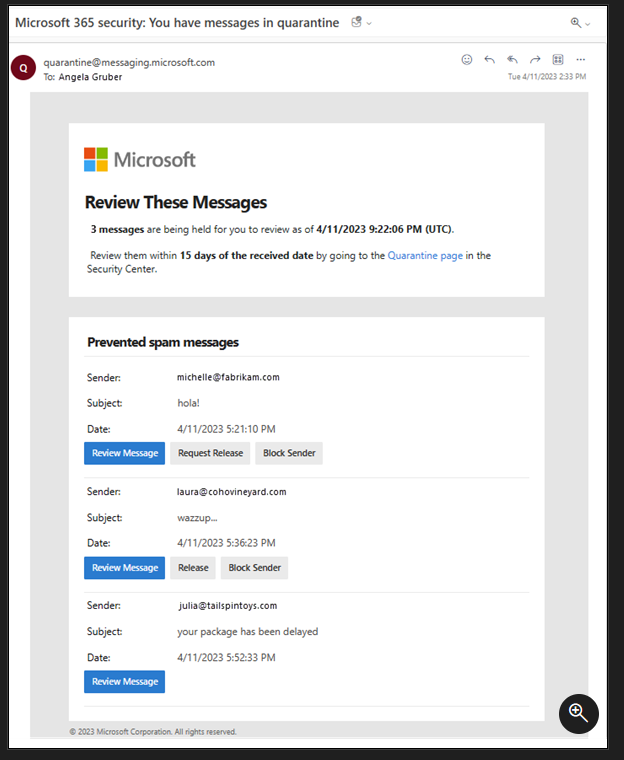
When an email has been quarantined, you will receive an email similar to the example screenshot. Click on the Review button to open the 365 Defender portal. When you selected an email to review, you be able to view the message details and determine if you are expecting this email.
Depending on the reason for quarantine, you may see different options here. You will have the option to preview message, remove from quarantine and block sender. If allowed, you will see the option to release the email or request to release.
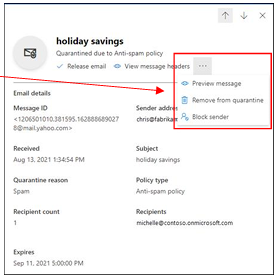
If you choose to release the email, it will be removed from quarantine and automatically delivered to your Outlook.
Please do NOT release quarantined emails that you are not expecting. If an external email address is continuously getting quarantined, there may be a misconfiguration at their end causing this.
Was this article helpful?
That’s Great!
Thank you for your feedback
Sorry! We couldn't be helpful
Thank you for your feedback
Feedback sent
We appreciate your effort and will try to fix the article